Inquiry Post #6

For my final inquiry post I chose to play a song that I love. Growing up my mom would sing this song to me as I fell asleep, so it felt like a perfect song. I used this simple Youtube video to learn the song.

Song: You Are My Sunshine

This song is really simple and only uses three chords:

  • The first chord is C, where you put your ring finger on the 3rd fret of the 1st string
  • Second chord is F, where you put your pointer finger on the first fret of the second string, and your middle finger on the 3rd fret of the 4th string.
  • Last chord is G, where you put your pointer finger on the 2nd fret of the 3rd string, your middle finger on the 2nd fret of the 1st string, and your ring finger on the 3 fret of the 2nd string
Voice recording taken on Charlie’s iPhone

Lyrics and chords:

  • C x 4: You are my sunshine, my only sunshine
  • F x 4: You make me happy
  • C x 4: When skies are gray
  • F x 4: You’ll never know, dear,
  • C x 4: How much I love you
  • C x 2: Please don’t take
  • F x 2: My sunshine
  • C x2: Away

Inquiry Post #5

For this post I wanted to focus on one of the songs I’ve been learning: Riptide by Vance Joy. It’s one of my favorite camp songs and I’ve always wanted to learn how to play it. It is an iconic ukulele song, so it just made sense to give it a try.

The song uses three chords the whole way through: Am, G, and C.

  • For Am, I put my pointer finger on the 2nd fret of the 4th string.
  • for G, I put pointer finger on the 2nd fret of the 3rd string, my middle finger on the 2nd fret of the 1st string, and my ring finger on the 3rd fret of the 2nd string.
  • For C, I put my ring finger on the 3rd fret of the 1st string.

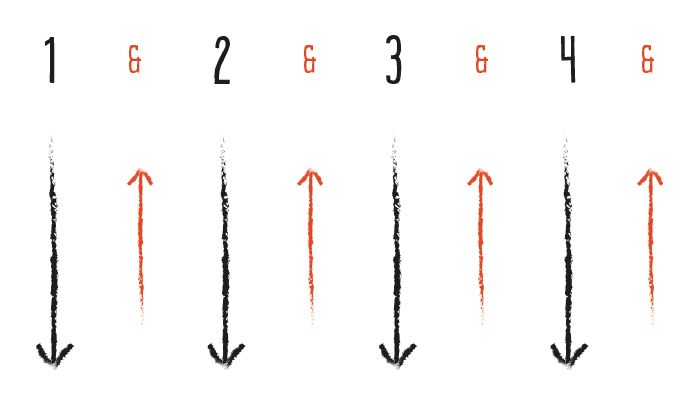
The strumming pattern is down, down, up, down, up, and that pattern continues throughout the whole song. Once I got the rhythm down and felt comfortable switching between chords (still not perfect), the song started to sound right!

Voice recording taken on Charlie’s iPhone

Inquiry Post #4

For this post I decided to learn Twinkle Twinkle Little Star and add an audio recording at the end! I’m still learning so it’s not the best, but I hope you enjoy! I used this really simple video to follow along and practice with.

This song could be used in an elementary classroom, especially younger grades like K-3. This is a great song for group activity and transitions!

This was a very simple song to learn and only uses 2 chords! Most of the song is played by only using the strings, which are G, C, E, A.

  • First chord is F, where you hold your pointer finger on the 1st fret of the 2nd string
  • Second chord is D, where you place your middle finger on the 2nd fret of the 3rd string
Voice recording taken on Charlie’s iPhone

Final Reflection

Looking back on this course, I honestly learned so much more than I expected about technology. I really liked that it was online on Fridays, it was such a nice way to end the week, staying in my pyjamas and watching from home. At the start, I remember feeling pretty overwhelmed and confused after the first couple of classes, the classes would move at a fast pace and I felt like I had missed important information. Creating the blog felt like a big job, and using a whole new classroom website plus building a blog on a new site took time to get used to.

Over time, I actually started to really appreacite that this course was completely seperate from my other classes. Having all my work in one place on my blog made it easier to stay organzied and was different than my usual assignments. Making a blog was such a unique way to hand in and publish my work. Creating a site URL, choosing colours and fonts, and setting up the layout how I liked was genuinely fun, and I spent a lot of time tweaking things until I was happy with it. As the semester went on, writing blog posts, adding pictures, including attributions, and using tags all became way easier, and now I feel confident that I can add a new post without overthinking it.

This course also had some of the most intersting and engaging presentations I’ve had in university. I found it really eye-opening to learn about how technology is affecting schools, and how teachers can prepare for both the benefits and challenges that come with it. I feel like a lot of my “under the surface” questions about technology and education were answered. I especially liked learning more about how COVID changed learning, and how tools like Zoom and online school reshaped classrooms and teaching.

One of the unexpected parts of this course was that it helped me regain an old hobby. Over the past few months, I slowly started learning how to play the ukulele again. In another course, I did a project on music in the classroom, and now I can see how learning the ukulele will be really helpful in my future teaching career. Even though I’m still not great, I’m practicing and I want to keep improving so I can eventually use music confidently with my future students.

This course pushed me out of my comfort zone to be creative and learn new tech tools, and helped me feel a lot more ready to bring technology, and maybe ukulele, into my future classroom.

AI in Elementary

AI is a pretty consistent topic in our course, so, I decided to look through our Mattermost chat and found this poster that really interested me. I find it weird to think about the fact that this poster is used in an elementary setting. When I was in elementary school, this was never something that was talked about because it wasn’t affecting us as much, and that was less than a decade ago. Now there are posters telling kids to keep their information private, use AI as a “helper,” check if it’s wrong or biased, and ask teachers if they’re confused. It really hit me how fast things have changed and how deeply AI has become a part of everyday school life.

A screenshot of an elementary poster used to teach kids how to use AI properly and safely.
Screenshot from Charlie’s iPhone

In one of our classes we all had the chance to share our opinions on AI being used in an elementary setting, and I found it really interesting to hear everyone’s perspectives. I noticed that my own opinion kept changing as I listened to other poeple. Some people were excited about the possibilites and how it could be used, and others strongly disagreed with the idea and said AI should not have a place in elementary schools. I can’t fully agree or disagree because on one hand you don’t want kids to lose their creativity and thinking skills, but AI and technology are everywhere now so pretending it doesn’t exist isn’t realistic either.

I think that this poster is age appropriate and a helpful tool for kids. It reminds kids to be safe, use other tools, and still add their own ideas instead of just copying what AI says. But at the same time, it kind of shocks me that we need this in schools now. It shows how much AI has impacted not just society in general, but education specifically. As a future teacher, it honestly worries me a bit, because it’s something I will always need to look out for and teach my students how to use AI properly and safely. I won’t just be teaching them subjects like math and writing, I’ll also be teaching them how to question what AI tells them, use it as a tool instead of a shortcut, and still trust their own ideas and thinking.

Dr. Bonnie Stewart Presentation on Datafication

This week I watched a presentation from Dr. Bonnie Stewart about datafication. Before this, I didn’t know what datafication was at all, but i found her presentation really interesting. She talked about her own career journey first, how she started out as a teacher, then did her master’s, and kind of fell into running an online education program. I thought it was cool that she basically learned how to use a computer by having to do the job, not because she was “a tech person” from the start. She also talked about how she had a background in humanities, and she kept connecting technology back to people, power, and how we live.

One of the main points that stuck with me was how every time we touch a device, we leave traces behind. Our clicks, searches, and actions become data that can be turned into patterns, be monetized, and sold. I use my phone all the time without really thinking about what I’m leaving behind, so hearing that was a shock. She said datafication promises to get rid of human error and make everything more “efficient,” but it also means a lot of decisions get made based on data about us, not by people who actually know us.

I also found it interesting when she talked about how so much has been digitized now, that people who don’t have cell phones or easy access to the internet are at a real disadvantage. Things that used to be more accessible face-to-face are now behind a screen. That made me think about students and families who might not have the same access, and how that can impact their opportunities in school and beyond. It also made me think about seniors. I know my grandparents struggle using technology and the internet, so this can make it harder for them.

Something I found interesting was when she talked about tests and teachers. She talked about how in the US, and sometimes in Canada, teachers can lose their jobs if their students don’t do well on standardized tests. Because of that, teachers end up teaching just for the test and stop spending time on experiences, discussions, and exercises that aren’t going to “show up” on a written test. As someone going into education, that worries me, because that’s not the kind of classroom I want.

Near the end, she mentioned how coding used to be the big thing schools were pushing for, kids had to learn it early, and now a lot of coding work can be automated. I remember my grandpa always wanting my sister and I to work on our coding because he told us it would be helpful in the future. That really showed how fast things change. I liked her line about literacy: “Literacy is the ability to take skill to the next level so you can make meaning out of it.” It’s not just about knowing how to use technology, but understanding what it’s doing and what it means for people.

Jesse Miller’s Presentation

I really loved Jesse Miller’s presentation, it was probably my favorite one from the whole course. I found his presentation super engaging because he talked about things happening in our own community. It wasn’t a boring presentation about technology, he gave real examples and focused on how teachers can be safe while using technology and protect their careers. His presentation went over things like digital consent, professional boundaries, and how teachers need to be careful with what they post online, even when it seems harmless. I learned so much during this short presentation and feel more confident knowing the consequences of sharing my own information or my students’ information online.

One thing that really stuck with me was when he talked about consent when recording students. He said that filming or recording students, even just their voices, isn’t consent. I didn’t know that before. Just because their faces aren’t being shown doesn’t make it okay, or mean they have consent. Ever since he said that, I’ve looked at TikTok and Instagram differently. There are so many teachers who post day-to-day videos of their classroom activities, sometimes with kids talking or even showing their faces or names. I’ve also seen nannies do the same thing, and now I can’t stop thinking about whether they actually have permission to post those videos. It made me wonder if principals or parents even know about these videos or if there are any consequences for teachers who don’t follow the rules.

Jesse also talked about privacy and how easily our information spreads. He explained that when you use Wi-Fi in places like airports or coffee shops, your data gets collected and kept. Even when bars or clubs scan your ID, that information stays in their system. Hearing that made me feel way more aware, and honestly a bit worried, about all the places my information is stored, because I’ve never really thought about it. It made me think about all the times I hit “I Agree” without actually reading the Terms and Conditions. The other day I downloaded an app to play mobile Skip-Bo, and keeping Jesse’s presentation in mind, I read through the terms and conditions. It said all kinds of things like having access to my email and phone number and promoting ads for other games on my social media platforms. I was shocked. It tells you exactly what it’s doing, but I’m too lazy to read through what I’m actually allowing it to do.

After this presentation, I’ve been more aware of how to be safe with technology and the internet when it comes to teaching, but also my own personal security in my day-to-day life, and how much of my information spreads without me realizing.

Inquiry Post #3

This week I worked on getting better at strumming and switching chords smoothly. I used a short TikTok video that showed some easy down-up srtumming patterns, which was a lot better than watching a long tutorial video. I practiced a few times this week, usually for about 30 minutes. The hardest part was keeping rhythm while moving between the chords C, G, Am, and F, but once I slowed it down, it started to sound better.

Screenshot of a strumming technique for the ukulele
Screenshot from Pinterest

The main thing I noticed was how much smoother it sounds when I relax and don’t overthink it. Switching chords isn’t perfect yet, but it’s getting easier each time. I liked the TikTok video because it explained things quickly and clearly, and I could follow along right away. It’s nice when things start sounding clean instead of all over the place, it makes it more fun to keep practicing.

I’ve been realizing how important it is to stay patient with myself. It’s easy to get frustrated when I mess up, but that’s part of learning. At my Link2Practice school, I saw a teacher play guitar and sing with our grade 1/2 class, and it made me realize I could use the ukulele in my own teaching. Even though the song was in French and my class is an English class, the students were still super engaged. It showed me how music can make learning fun and build a sense of community in the classroom.

I’m slowly starting to feel more comfortable playing the ukulele. My goal is just to keep things sounding cleaner and more consistent each week. I can already notice a difference each time I play, and I’m excited to keep going.

Weekly Update

Lately, I haven’t been keeping up with my blog as much as I would like. With other class and responsibilities, it’s been a bit hard to stay consistent. That said, I’m really enjoying the process. Customizing my blog by changing fonts, colours, and templates has been super fun, and I’m finally starting to get the hang of attributing photos properly. When I first started this course, I had no idea what I was doing, so even small steps like this feel like progress to me. I’ve also been enjoying my process with relearning the ukulele, which has been a fun way to take a break from schoolwork while staying off my phone. Finishing a Youtube tutorial and slowly being able to play a song, even if I don’t always play the chords right, is really satisfying. My roomate has been happy to listen to my beginner attempts, which makes it even better, to “show off” my new skills I learn each time I practice. In my Link2Practice class, I’ve noticed how much music is used throughout the school and how beneficial it can be. Whether it’s songs during lessons or students in grades 3-5 learning violin before school, music seems to support learning and engagment in meaningful ways. This makes me excited to think about how I could use the ukulele in my own future classroom, not just for fun but also as a tool to teach lessons and help with memorization. Even though I’m feeling a bit behind and a little overwhelmed with my blog updates, I’m looking forward to continuing to keep practicing and building my skills with both my blog and the ukulele.